
Scenario
Imagine you’re scrolling through the backend code of your website’s html document until poof. You somehow delete all of the content by accident and can’t retrieve it. You now have no way to redo your mistake and now you’re left with a large chunk of your website gone. This can be a harsh situation to be in, that’s unless you saved a backup of your website. Website backups are a saved ‘checkpoint’ of your website from a certain time. These ‘checkpoints’ contain the information of the website from the given time it was saved. It’s important to ensure that you backup your websites in case it falls into the hands of the scenario you just read (Or even worse scenarios!).
Types of Backups
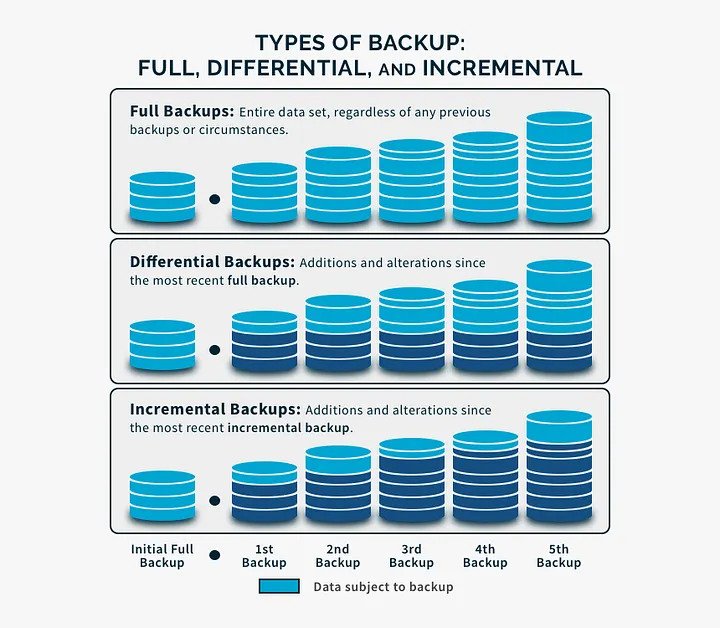
There are 3 Well-known types of backups. Full, incremental, & differential backups. Full backups are the simplest type of backup there is. Full backups save everything from a certain point of time. Differential backups are backups that save changes since the last full backup, they can be demonstrated on the picture to the right. Incremental backups are backups that save changes since the last backup. This means that incremental backups could really save changes from itself, differential, or full backups. If we were to scale these from most to least ‘complex’, it would go Full Backup–>Differential Backup–>Incremental Backup.
Consequences of an Un-backed website.
There are many consequences to not backing up your website. It can be as simple as accidentally deleting your data and being unable to retrieve it. Sometimes files may corrupt and you’re left with corrupted work. Hackers can also implement malware and hack your website. Honestly, there are just too much consequences of not backing up your website that there’s really no reason to keep it waiting.
The GitLab Incident.
According to this source, a GitLab database administrator deleted data from their main database server by accident in 2017. The deletion resulted in 5,000 projects and 700 user accounts lost. However, it definitely could have been much worse if not for the GitLab team backing up critical client data on other servers. This truly demonstrates that a simple backup could really save you from large amounts of damage, as happened to the GitLab team. Even though they’d just lost a ton of data, they were able to restore the critical client data thanks to backing it up on mirror servers. Really shows how important backing up is.
Conclusion.
Now that we’ve gone over the importance of website backups, let’s recap. A website backup is a saved ‘checkpoint’ of your website data from a certain time. There are 3 types of backups—Full backups, differential backups, & incremental backups. If you don’t backup your website, you risk losing important information from your website. We’ve went over that backing up websites has saved big websites from collapsing, as said in the ‘GitLab Incident’. Now that you know the importance of website backups, what are you waiting for? When it comes to backing up your website, you really have nothing to lose!